Automation Tools for Editorial Teams
Automation Tools for Editorial Teams is a workflow note for readers weighing repeat tasks, approval safety, error recovery, notifications, and avoiding fragile shortcuts. The creator-operations decision note explains what to check before buying, who should skip it, and where the purchase can become more work than it first appears.
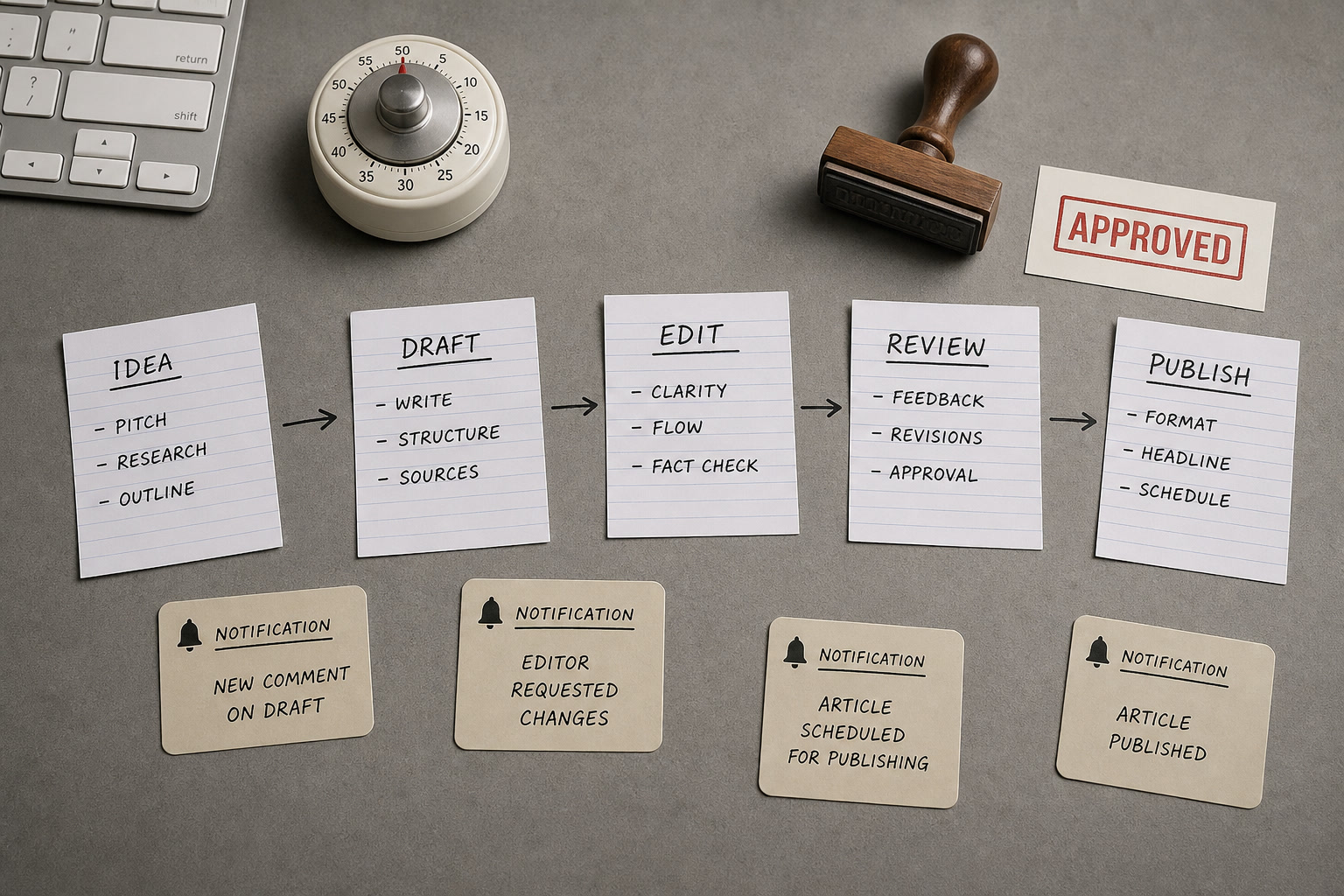
In the quiet, deliberate space of independent publishing, the tools we use to shape our words are as vital as the physical desks we sit at or the paper we print on. Yet, as editorial teams scale, the pure act of writing is increasingly crowded out by the invisible, friction-filled labor of digital administration: formatting markdown, resizing imagery, verifying affiliate links, syncing content across content management systems, and updating metadata. When a writer spend forty minutes of every hour wrestling with database properties or manual copy-pasting, the creative rhythm is fractured. Editorial automation should never aim to replace the human eye, the singular voice, or the careful curation that defines a publication like FikaLooks. Instead, it must serve as an invisible, silent infrastructure-a digital loom that handles the repetitive warp and weft of production so that editors can focus entirely on the shape of the work. To build this infrastructure requires a critical, unsentimental look at the software landscape, treating digital tools with the same scrutiny we apply to a well-made coat: assessing their material durability, their maintenance burdens, and their long-term cost to our creative sanity.
The Anatomy of Editorial Friction: Identifying the Invisible Tax
Every publication has its own silent friction points-those repetitive, non-creative tasks that feel like sand in a delicate gear mechanism. In a modern editorial workflow, this friction usually manifests during the transition from a finished draft to a published piece. Editors find themselves opening half a dozen browser tabs to compress high-resolution images, generate tracking links, check for broken URLs, and format text for different distribution channels. This manual handling is not merely time-consuming; it is a significant source of human error. A misplaced UTM parameter or a broken link can quietly erode reader trust and revenue, while the cognitive load of performing these micro-tasks saps the energy required for deep, analytical editing.
To diagnose where your workflow is leaking energy, you must map the lifecycle of a single article. Note every moment an editor is forced to leave the writing environment to perform an administrative action. If your team drafts in a collaborative space like Notion or Google Docs but publishes in WordPress or Shopify, the translation process is often fraught with formatting anomalies. Extra line breaks, stripped styling, and lost image captions require manual correction. By identifying these specific transition points, you can target automation where it matters most, rather than deploying complex software suites that solve problems your team does not actually have.
The goal of automating these routines is to establish a clean, tactile flow. When an editor marks a piece as "Approved," a series of quiet, background actions should trigger: images are automatically optimized and uploaded to the media library, affiliate links are validated against an active database, and a clean, perfectly formatted draft is staged in the CMS. This level of operational hygiene ensures that the final steps of publishing feel like a satisfying closing ritual rather than a stressful scramble against a deadline.
Migration Risks and the "Return Policy" of Software Ecosystems
In the design world, we understand the risk of purchasing a highly bespoke piece of furniture that only fits one specific room; if we move, it becomes useless. The same principle applies to editorial software. When you commit your archives, editorial calendars, and workflow logic to a proprietary platform, you are accepting a significant migration risk. If that platform raises its prices, changes its terms of service, or suffers from declining performance, extracting your data and rebuilding your processes elsewhere can be a monumental, costly task.
To protect your publication from vendor lock-in, prioritize tools that support open standards and clean data portability. Drafts should ideally be composed and archived in Markdown-a lightweight, plain-text formatting language that can be read by almost any text editor and easily imported into any modern CMS. Your editorial database, whether housed in Airtable or a custom SQL database, should be structured in a way that allows for easy, comprehensive CSV or JSON exports. Avoid tools that store your content in proprietary, nested formats that require complex scripts to untangle.
Before adopting any new automation tool, conduct a hypothetical "return policy" assessment. Ask yourself: if we had to abandon this software tomorrow, how long would it take to recover our data, and what would the manual workaround look like? If the answer involves weeks of manual copying and pasting or hiring an expensive database engineer, the tool is a structural liability. The most resilient editorial stacks are those built on modular, swappable components that communicate via clean, standard APIs.
Digital Archiving: Organizing the Virtual Wardrobe
A beautiful physical archive is a source of inspiration and historical record; a digital archive should be no different. Yet, many editorial teams suffer from a chaotic digital wardrobe, with assets scattered across Google Drive, Dropbox, Slack threads, and local hard drives. This lack of structure makes retrieving past imagery, referencing old drafts, or repurposing evergreen content an exercise in frustration. An automated archiving system acts as a digital curator, ensuring that every asset is cataloged systematically without requiring manual sorting.
An elegant archiving workflow begins the moment a piece of media is uploaded. Automation can be used to automatically rename files according to a strict, logical naming convention (e.g., YYYYMMDD_ArticleTitle_AssetNumber), generate appropriate alt text using metadata, and store the file in a centralized, searchable repository. Similarly, once an article is published, a complete archive of the final text, along with its metadata, publication date, and author attribution, should be automatically written to a master database. This creates a single source of truth that remains independent of your live website.
This level of organization pays dividends over the long term. When it comes time to compile a seasonal gift guide, review past editorial performance, or train a new editor on the publication's visual style, a structured archive allows you to locate assets in seconds. By treating your digital files with the same respect you would show to physical inventory, you preserve the institutional memory of your publication and make your entire archive an active, usable asset.
The Slow-Tech Stack: Curated Alternatives for Mindful Production
Building a mindful editorial stack is not about adopting the most complex, feature-rich tools on the market; it is about selecting a few high-utility, beautifully designed instruments that do their jobs exceptionally well. For drafting and collaborative editing, markdown-based editors like Obsidian or minimalist databases like Notion offer a clean, distraction-free environment. These platforms allow writers to focus on the cadence of their sentences without being overwhelmed by complex formatting toolbars or busy interfaces.
For the connective tissue of your automation, platforms like Make.com or Retool offer visual, highly customizable environments that allow you to build precise workflows without writing extensive custom code. Unlike rigid, pre-built integrations, these tools let you map out your processes to match your team's exact habits. For instance, you can design a workflow that only runs at the end of the day, batch-processing all image optimizations and link checks at once, preserving your team's focus during peak writing hours.
Finally, consider the role of custom, lightweight scripts. Often, a simple Python script run locally can replace a costly monthly software subscription. A custom script can be tailored to perform highly specific tasks-such as scanning your site for broken affiliate links or formatting a newsletter layout-without the overhead, data-sharing concerns, or interface clutter of third-party platforms. By choosing a lean, deliberate tech stack, you retain control over your digital environment and cultivate a calmer, more focused working atmosphere.
Pre-purchase checklist
- Audit your current workflow to identify the three most repetitive, non-creative tasks that consume your editors' time weekly.
- Ensure all drafts are composed in Markdown or a highly portable format to prevent proprietary vendor lock-in.
- Set up a modular automation structure where a failure in one system (e.g., social sharing) does not disrupt the core publishing pipeline.
- Establish a strict, automated naming convention and central repository for all editorial images and media assets.
- Schedule a recurring monthly fifteen-minute maintenance check to review API connections, update credentials, and clear failed automation runs.
Who should skip this
You should skip implementing complex automation tools entirely if your editorial team consists of only one or two creators publishing less than three highly curated, long-form pieces a week. In small-scale, slow-publishing environments, the time and financial investment required to build, monitor, and maintain automated pipelines far outweighs the minutes saved. Introducing database integrations, API connectors, and automated staging steps into a small workflow often adds unnecessary cognitive overhead and technical anxiety, turning a simple, intimate writing practice into an administrative chore. For small teams, a clean text editor, a single shared spreadsheet for scheduling, and manual, thoughtful uploads directly into your CMS remain the most elegant, reliable, and satisfying way to work.
Affiliate transparency
FikaLooks is supported by its readers. When you choose to adopt software or tools through our curated recommendations, we may earn a modest commission. We only recommend platforms, utilities, and hardware that we have thoroughly vetted, integrated into our own daily workflows, and believe meet our strict standards for utility, design, and longevity. We never accept payment for positive reviews or allow affiliate partnerships to influence our editorial independence.
FAQ
Will automating our editorial pipeline make our published content feel sterile or homogenized?
Not if you automate the administrative scaffolding rather than the creative act itself. Automation should only touch mechanical processes-such as image compression, link validation, metadata syncing, and file archiving. The writing, editing, curation, and visual direction must remain entirely human. By removing the exhausting administrative tasks, your team actually has more time and mental clarity to refine their unique editorial voice.
What is the realistic learning curve and setup time for a modular automation stack?
For a team using modern visual automation platforms like Make.com or Airtable, expect an initial setup period of ten to fifteen hours spread over two weeks to design, test, and refine your core workflows. The learning curve for basic operations is gentle, but mastering error-handling and complex API integrations requires patience. We recommend designating one team member as the systems steward to oversee this transition.
How do we handle high-resolution visual assets without losing quality during automated compression?
Your automated workflows should use precise, professional-grade image processing APIs (such as TinyPNG or Cloudinary) configured with specific quality thresholds. This ensures that while file sizes are reduced dramatically for fast web loading, the visual clarity, color profiles, and artistic integrity of your photography are preserved. Always retain the original, uncompressed high-resolution files in your secure digital archive.
Is it safer to rely on custom-coded scripts or paid, off-the-shelf automation platforms?
Paid, off-the-shelf platforms like Make.com or Zapier are generally safer and more efficient for teams without dedicated in-house developers, as they handle API updates and server maintenance automatically. However, if your team has technical expertise, writing custom, lightweight scripts hosted on your own servers offers unparalleled control, eliminates monthly subscription fees, and completely removes third-party data privacy risks.